SmartoxA receptionist for every call

Every call answered, and every caller handed to your team as a next step.

Smartox picks up your business line day and night, talks with callers the way your front desk would, and sends your team a short summary of each call. When a caller wants to book, buy, get a quote or complain, it becomes a lead with their details already filled in.

Answers 24 hours a daySpeaks 18 languagesPasses the call to a person when needed
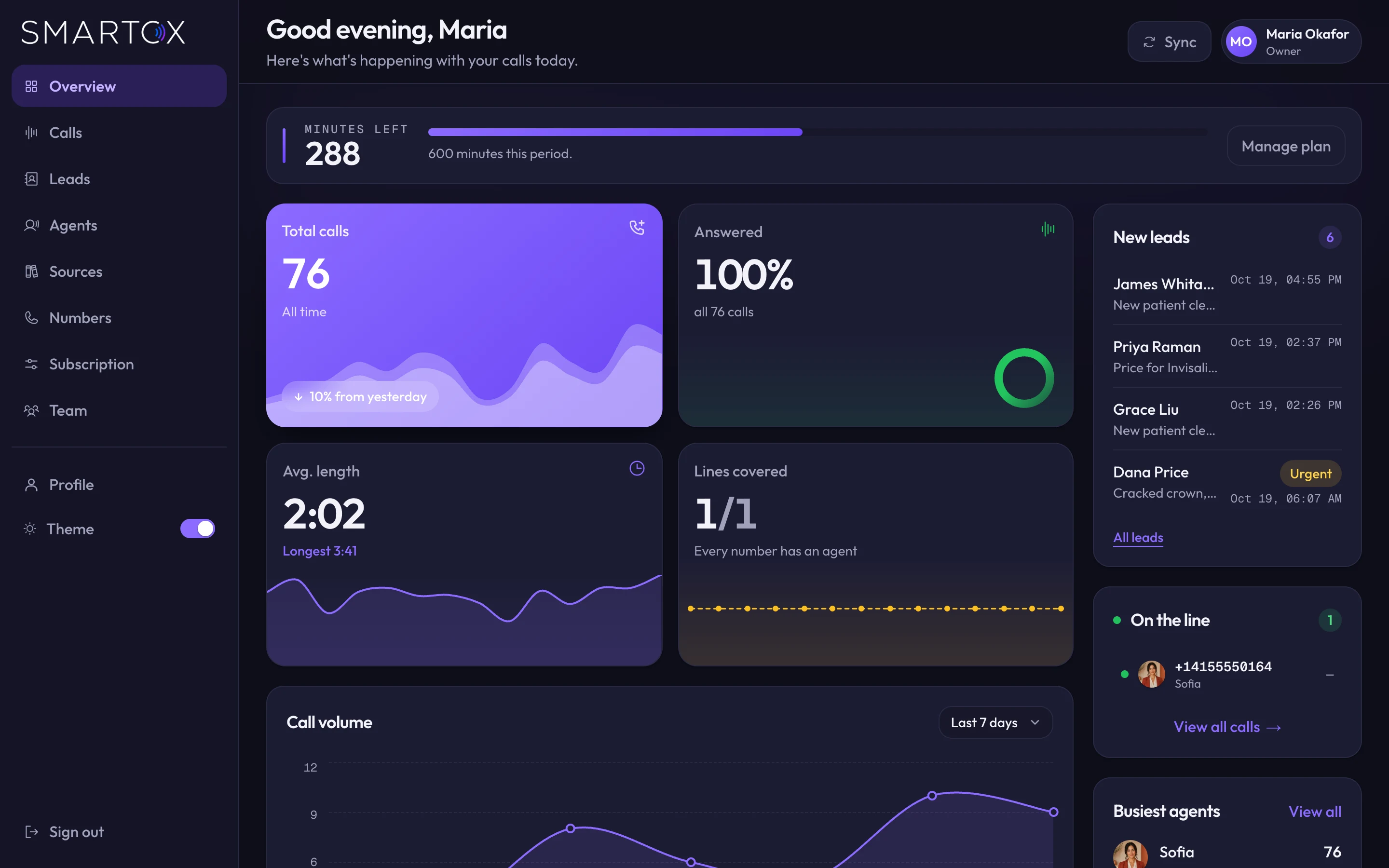
Smartox · Overview
Smartox overview for a dental studio showing 76 calls, all answered, new leads and a call in progress
The problem

A missed call is a customer ringing the next business on their list.

People who phone usually want something now. If the line rings out or goes to voicemail, the next business in their search results is one tap away.

9:14 pma patient cracks a crown

The call after closing

The practice closed at six. Whoever answers that call first gets the emergency visit, and probably the patient for years after.

3 linesringing, 1 person at the desk

The call during the rush

Your receptionist is checking someone in. The phone rings, then rings again. The caller asking about a $5,000 treatment hangs up.

0details in the voicemail

The message nobody can act on

"Hi, it's about my appointment, call me back." No name, no number spoken clearly, no idea which appointment.

One call, start to finish

9:14 pm at a dental studio that closed three hours ago.

This is the kind of call Smartox handles for Northside Dental Studio, a sample practice we use in demos. Press play to follow it through.

SofiaNorthside Dental Studio · after hours
Call ended · 2:41
  1. Thanks for calling Northside Dental Studio, this is Sofia. How can I help you tonight?
  2. Hi, I cracked a crown at dinner. It's not bleeding but it really hurts when I bite.
  3. I'm sorry, that sounds painful. The office is closed right now, but I can get you in front of the team first thing. Can I take your name?
  4. Dana Price.
  5. Thanks, Dana. What's the best number to reach you on in the morning?
  6. This one's fine. Any time after eight.
  7. I've marked this as urgent, so someone will call you between 8 and 9 am. Until then, try to chew on the other side and avoid anything very hot or cold.

What the team sees at 8 am

Summary Callback Urgent

Dana Price cracked a crown at dinner and is in pain when biting. Wants a callback between 8 and 9 am.

New lead
Name
Dana Price
Wants
Emergency visit for a cracked crown
Call back
Tomorrow, 8 to 9 am
Status
New · emailed to front desk

Smartox never tells a caller their visit is booked. It takes the details, says the team will confirm, and your staff make the booking.

After every call

Read a three-minute call in ten seconds.

Each call arrives with a one-line summary and a label: booking, quote, callback, complaint or just a question. The full transcript and the recording sit underneath for when you need them.

  • See who called, how long they spoke and what they wanted
  • Watch calls that are happening right now
  • Turn recording off for any receptionist if you'd rather not keep audio
Smartox · Call detail
Smartox call detail with a summary, booking and lead labels, the transcript and the recording
Leads

Callers who want something land on a list your team works through.

A new patient asking for Tuesday mornings. A price question about Invisalign. A billing complaint that needs the office manager. Each becomes a lead with the caller's name, number and request, and your team gets an email the moment it arrives.
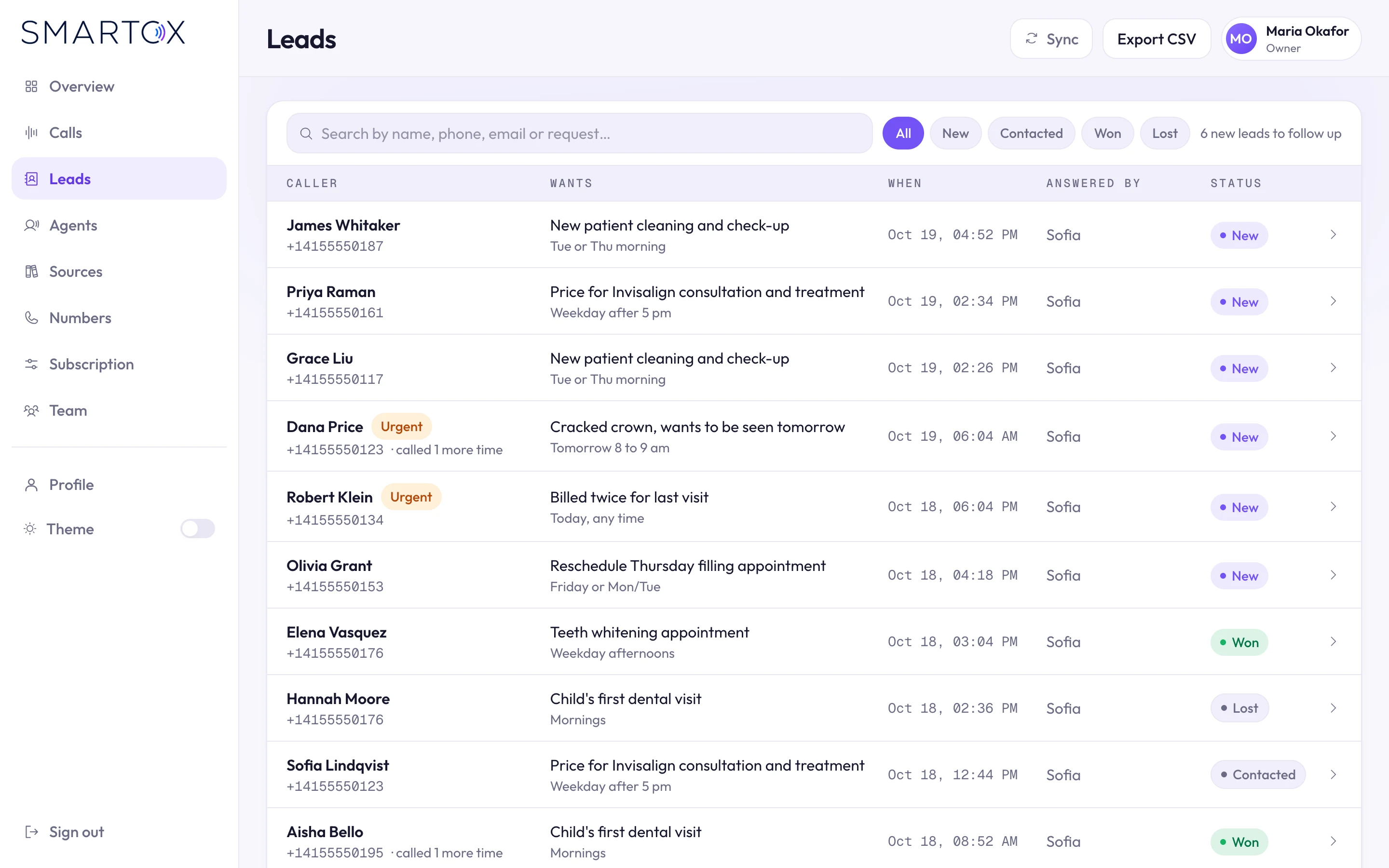
  • Mark leads as contacted, won or lost, and add notes
  • Urgent callers are flagged at the top
  • Download the list for your CRM whenever you like
Smartox · Leads
Smartox leads list with new, contacted, won and lost filters and urgent badges
Your receptionist

Sounds like your front desk, follows your rules.

Pick a receptionist voice, write the greeting, and choose what she asks every caller for: date of birth, insurance provider, the best time to call back. Set the number she passes calls to when a caller needs a person.

Then type to her as a caller and see how she answers, before a single customer hears her.
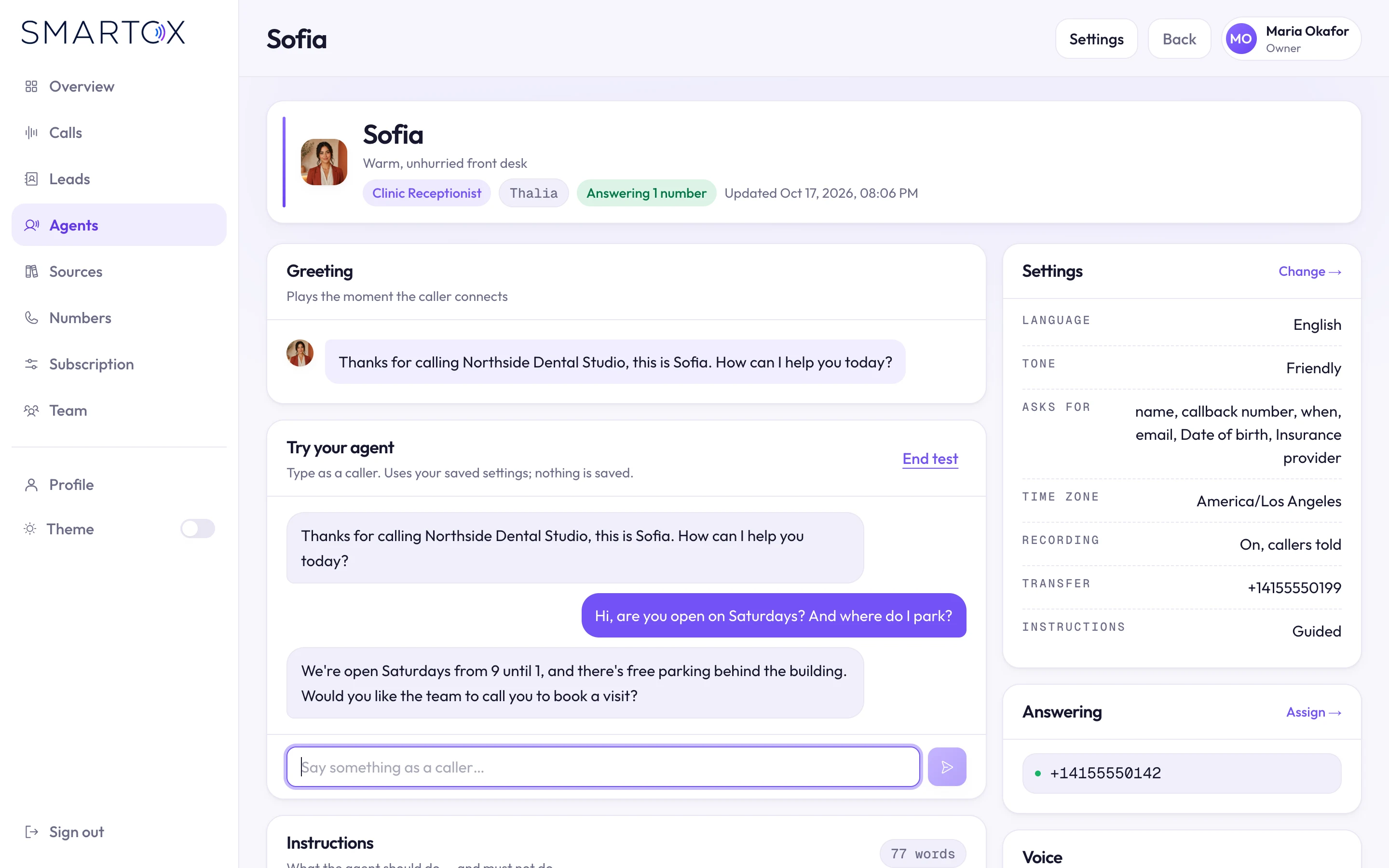
Smartox · Receptionist settings
Smartox receptionist settings with greeting, a test conversation and settings for tone, questions, recording and transfer
What it knows

Changed your hours? Tell it in one sentence.

Smartox reads your website when you sign up, so it already knows your services, opening hours and the insurers you accept. When something changes, type it in plain words and confirm. It also re-reads your site on a schedule.
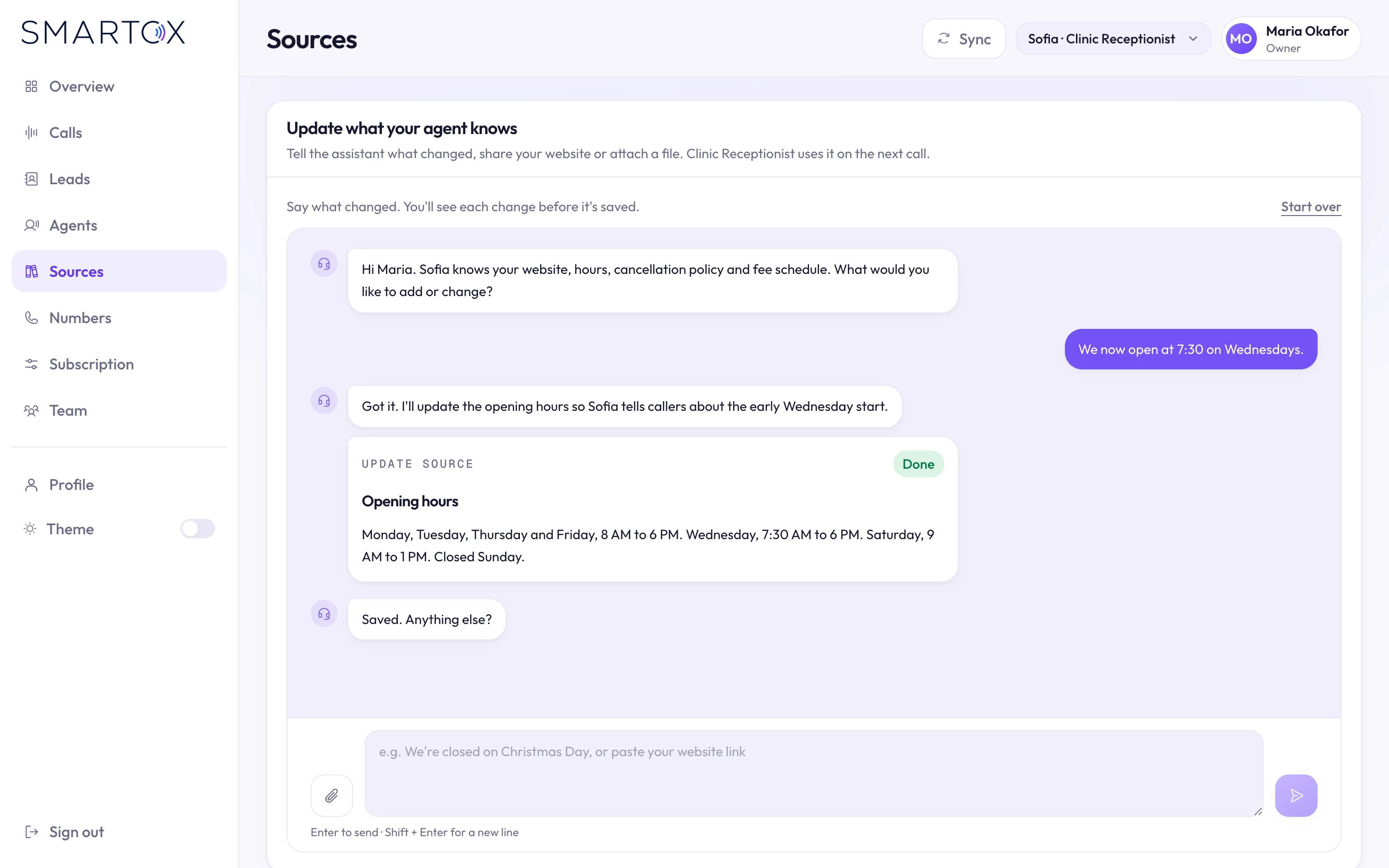
Smartox · Sources
Smartox sources chat where the owner updates Wednesday opening hours in one message
Getting started

Live in four steps, without a call to your phone company.

Step 1

Your business

Give Smartox your website. It pulls out your name, hours, services and booking details, and asks only about what it couldn't find.

Step 2

Choose a receptionist

Listen to the voices, pick one that suits your business, and set the greeting.

Step 3

Get your number

Claim a phone number from inside Smartox. You don't need an account with a phone carrier.

Step 4

Choose a plan

Start on a free trial with no card. Add minutes or extra numbers as calls grow.

Who it's for

Businesses where the phone still brings in the work.

  • Clinics and dental
  • Salons and spas
  • Real estate
  • Auto services
  • Home services
  • Law firms
  • Accounting and tax
  • Education and training
  • Retail stores
  • Restaurants
  • Fitness studios
  • Veterinary
For larger teams

Ready for more than one location and more than one manager.

Multi-site groups and firms can run Smartox the way they run the rest of the business, with roles, sign-off and a single invoice.

  • Shared workspaces with roles.Decide who can see calls, who works leads and who handles billing. Invite people and manage seats.
  • Callers in their own language.Each receptionist can answer in any of 18 languages, including English, Spanish, Arabic, Hindi, Urdu, French and Mandarin.
  • Callers' words stay private.Transcripts are processed with data retention switched off at the AI provider, so they aren't stored or collected there.
  • Locked-down sign-in.Two-step login with recovery codes, verified emails, and one click to sign everyone out.
  • Enterprise contracts.Custom minutes and numbers on a contract, billed by invoice.
Questions

What owners ask us first.

Can it book appointments into my calendar?

It takes every detail your team needs to book: name, number, what they want and when suits them. Your staff confirm the booking. Smartox tells callers this, so nobody turns up to a slot that doesn't exist.

What happens when a caller needs a real person?

You set a transfer number, and Smartox passes the call to it when the caller needs someone on your team.

Can callers interrupt it?

Yes. If a caller starts talking, Smartox stops and listens, the way a person would.

What does it know about my business?

What's on your website, plus anything you tell it: hours, holiday closures, branches, prices, parking.

How long until it's answering calls?

The setup is four steps. Most of the time goes into reading what it found on your website and choosing a voice.

Can I try it before paying?

Yes. There's a free trial that doesn't ask for a card. For multi-location groups we set up a pilot with you instead.

Next step

Hear Smartox answer your business.

Send us your website. We'll set up a receptionist with what's on it and try her out with you during the demo, with the people who built Smartox on the call.

Replies within 24 hours, every working day. NDA ready on request.